An algorithm that trades the setup for you.
Crown Pips Algo is an Expert Advisor for MetaTrader 5. It runs on your own account and trades one setup on XAU/USD automatically — the breakout of the Asia range at the London open — with a fixed stop, a fixed target and hard limits on risk.
- Runs on your own MT5 account
- Works with any MT5 broker
- 0.5% risk per trade, adjustable
- Switch it off any time
Risk warning. CFDs are leveraged and carry a high risk of losing money. Automated trading can lose money too. Past or simulated results don't guarantee future results. Not financial advice. Full risk disclaimer
Four steps from the bot to your chart.
You need Elite, an account with any broker that offers gold on MetaTrader 5, and MT5 on a computer or a VPS.
- Step 1
Get Elite
Pick Elite Yearly or Monthly on the Plans page or in @crownpipsgoldbot, and pay via Stripe.
- Step 2
Get Crown Pips Algo
Rolling out to Elite members in batches: the Expert Advisor (EA) for MetaTrader 5, your licence key and the install steps.
- Step 3
Install it on your own MT5
Add it to MT5 on your PC or a VPS and attach it to your broker's XAU/USD chart.
- Step 4
Set your risk
Pick your risk per trade (default 0.5%). It then trades the London-breakout setup on XAU/USD automatically.
Tip: run it on a demo account first, so you see how it trades on your broker before real money is involved.
Watch the rules play out.
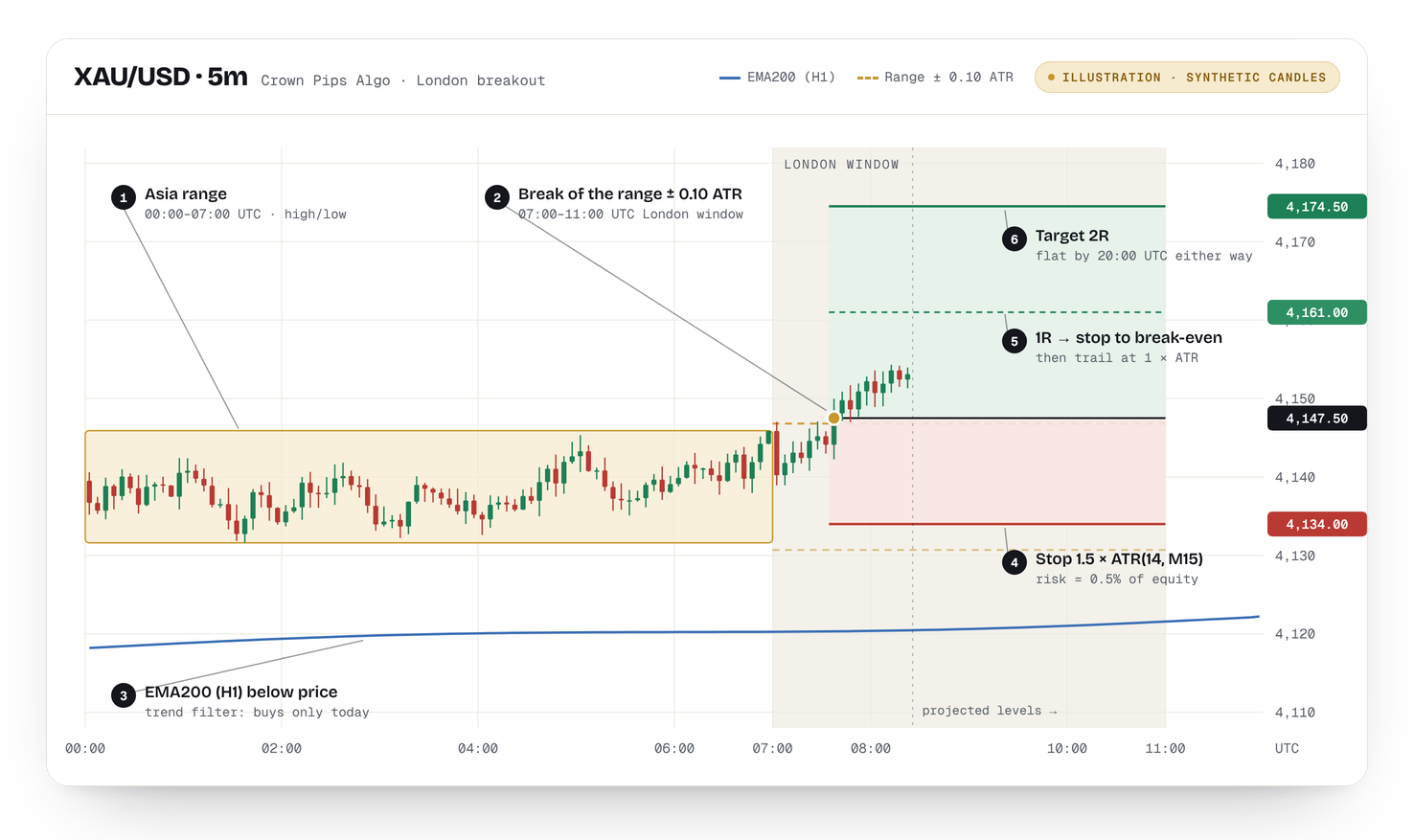
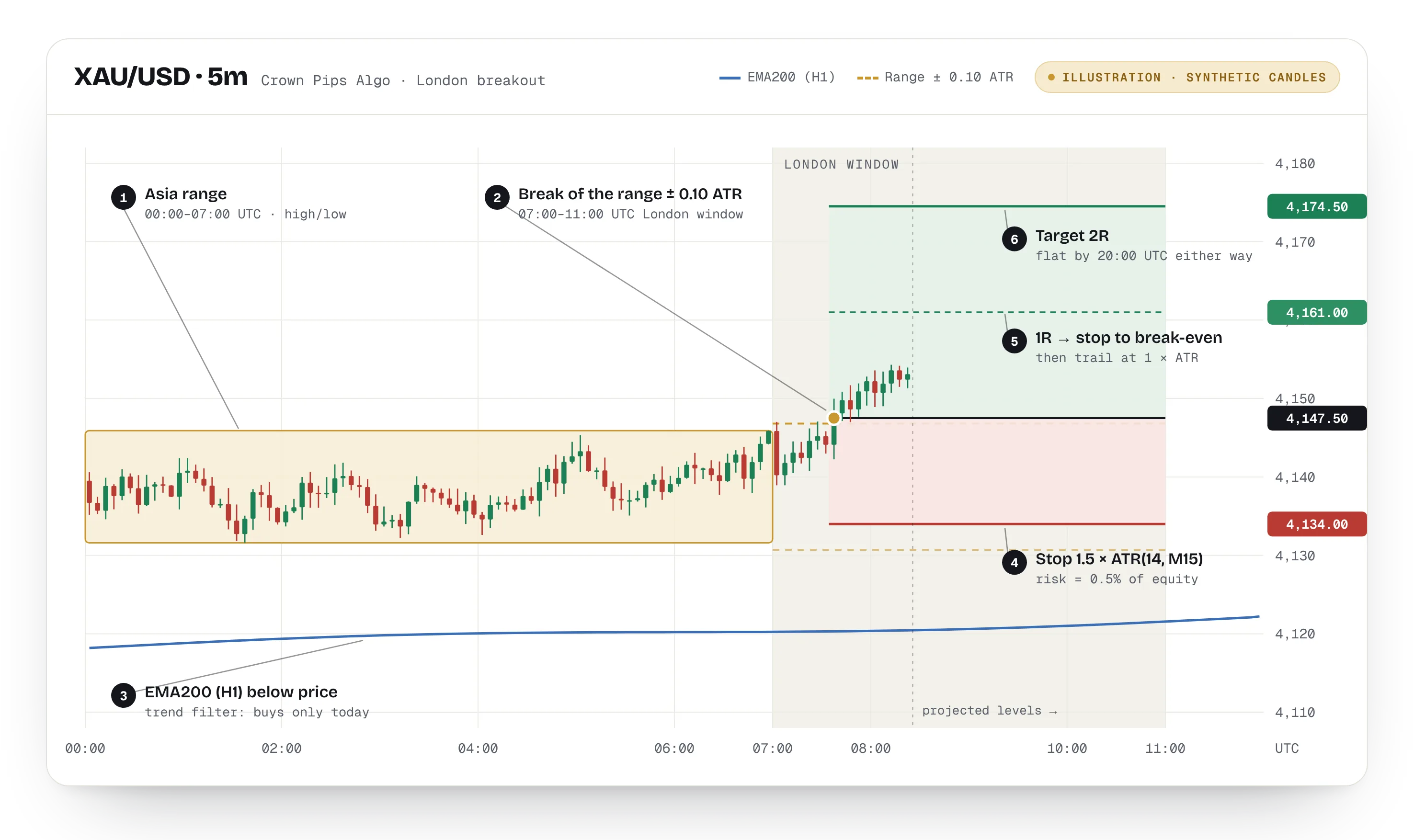
Scroll through one example trade: the range, the breakout, the stop and target, and how the stop moves once the trade runs.
- 1Asia range · 00:00–07:00 UTC
The Algo marks the high and low of the Asia session. If the range is narrower than 0.8 × ATR or wider than 6 × ATR, it skips the day.
- 2Breakout · 07:00–11:00 UTC
A break of the range plus a 0.1 × ATR buffer triggers the entry — only in the direction of the H1 EMA200. Here price is above it, so only a buy is allowed.
- 3Stop loss and take profit
Stop 1.5 × ATR(14, M15) from entry, target at 2R. The size is set so that the stop costs 0.5% of your account, using your broker's tick value.
- 4Break-even at 1R
When price reaches 1R, the stop moves to break-even or better, then trails 1 × ATR behind price.
- 5Exit
The trade ends at 2R, at the trailing stop or at 20:00 UTC, whichever comes first. Many trades hit the stop loss instead.
Three windows. Nothing outside them.
The Algo only looks for entries four hours a day. The rest of the day it measures, manages, or does nothing.
The Asia session sets the high and low. No trades.
London opens. A break of the range + 0.1 × ATR can trigger one trade per direction.
No new entries. Open trades move to break-even at 1R and trail.
Everything is closed. Fridays too, so nothing is held over the weekend.
Twelve rules, no exceptions.
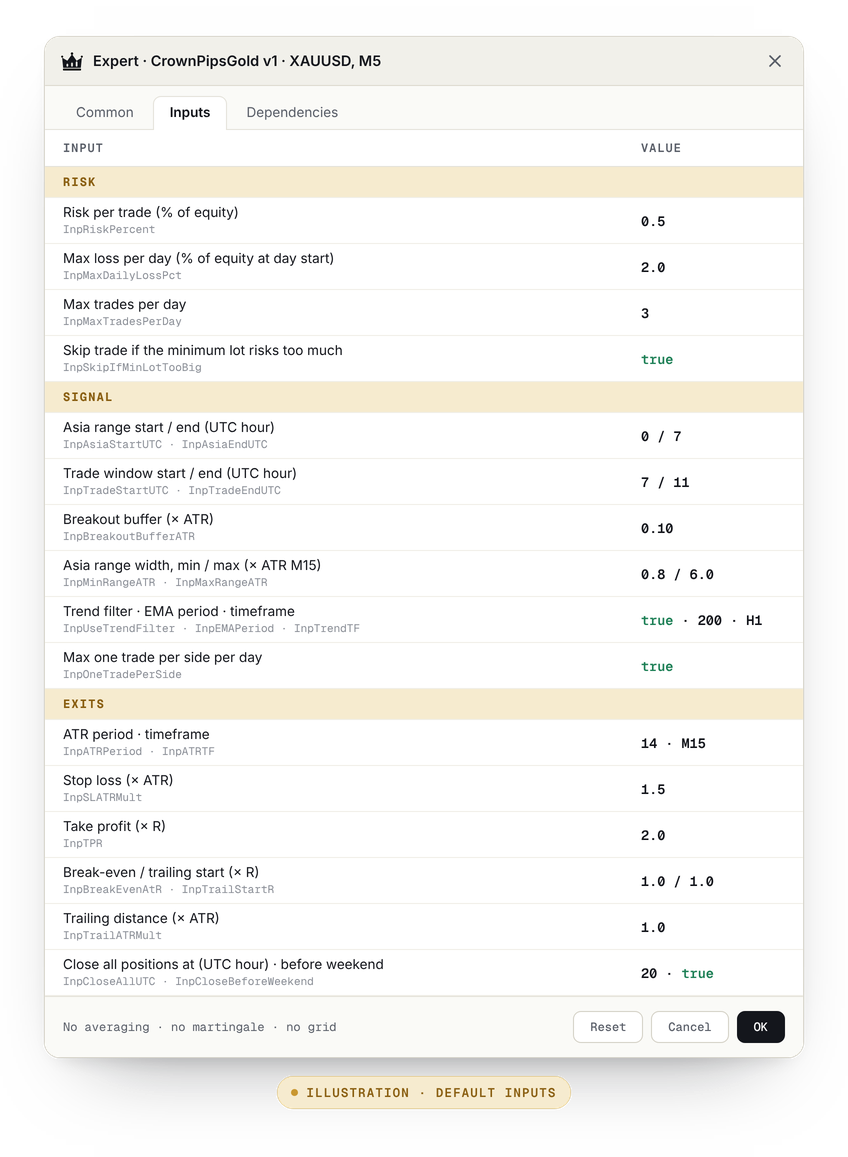
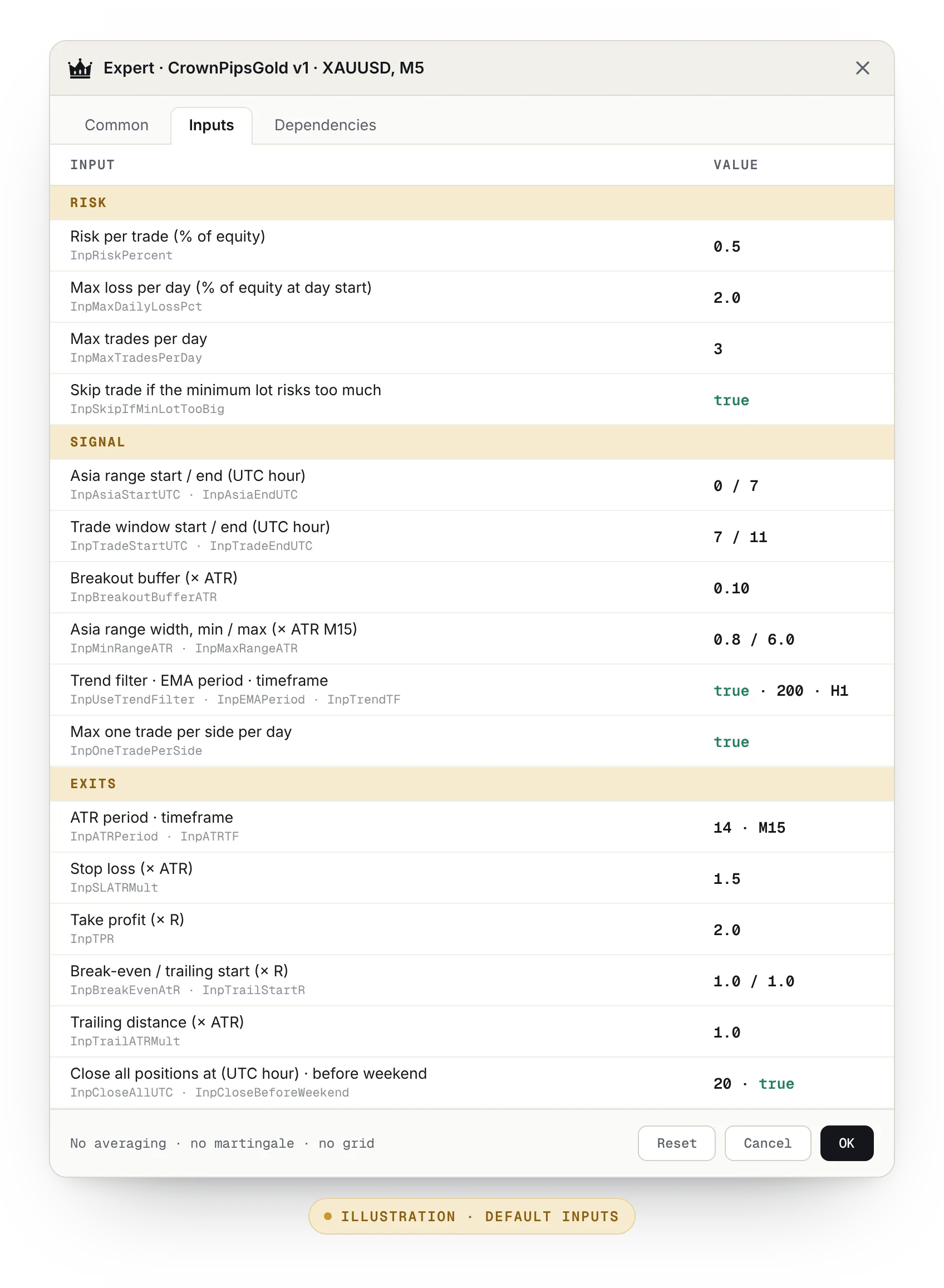
These are the default inputs of the Expert Advisor. Same numbers, same order, every trading day — and every one of them is a setting you can see and change.
Risk
- Risk per trade 0.5% of your account
Adjustable. The default risks 0.5% of account equity on every trade.
- Max daily loss −2% → stops for the day
Once the account is down 2% on the day, it takes no new trades until the next day.
- Max trades 3 per day
Never more than three trades a day, and one per direction.
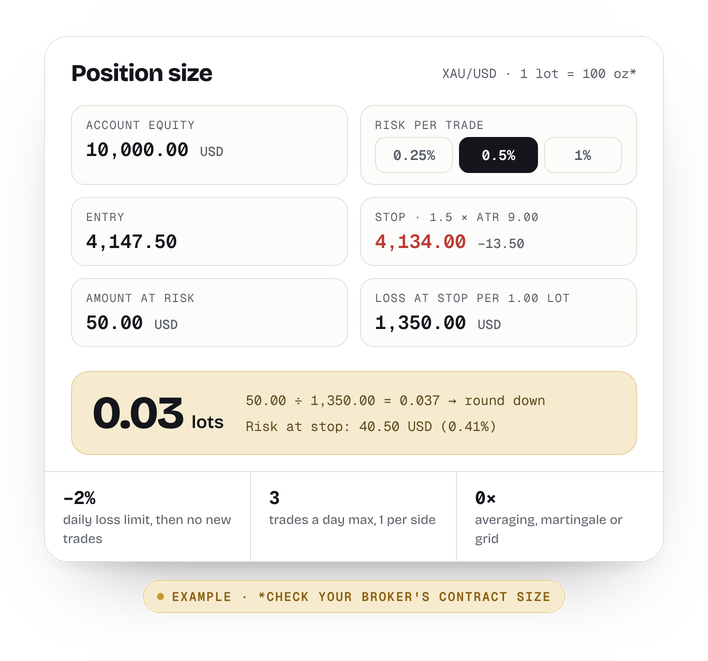
- Position size From your broker's tick value
Calculated from the stop distance and your broker's tick value, always rounded down. If the minimum lot would risk too much, the trade is skipped.
Entry
- Asia range 00:00–07:00 UTC
The high and low of the Asia session form the range for the day.
- Range filter 0.8–6 × ATR
If the range is narrower than 0.8 × ATR or wider than 6 × ATR, the day is skipped.
- Entry window 07:00–11:00 UTC
Entries only in the London window, on a break of the range + a 0.1 × ATR buffer.
- Trend filter EMA200 · H1
Buys only while price is above the hourly EMA200, sells only below it.
Exit
- Stop loss 1.5 × ATR(14, M15)
Measured on the 15-minute ATR at entry and sent with the order to your broker.
- Take profit 2R
Two times the risk, also sent with the order.
- Break-even + trailing From 1R
At 1R the stop moves to break-even (or better), then trails 1 × ATR behind price.
- Daily close 20:00 UTC
Everything is closed at 20:00 UTC, Fridays included. Nothing is held overnight.
What it never does
- Average down or add to a losing trade
- Martingale or grid position sizing
- Trade outside the London window
- Hold positions after 20:00 UTC
- Round a position size up
- Keep trading after a −2% day
Works with any MT5 broker.
If your broker offers gold (XAU/USD) on MetaTrader 5, the Algo can run there. No special broker, no new account.
Any MT5 broker with XAU/USD
Use the broker you already have. Attach the Algo to your broker's gold chart — the symbol name can differ (XAUUSD, GOLD, …).
Sizing from your broker's tick value
Lot size comes from your broker's own tick value and tick size, so different contract sizes for gold are handled.
Sessions in UTC
Set your broker's server-time offset once, so the Asia range and the London window line up in UTC.
Spread filter
Entries are skipped while the spread is wider than the max-spread input, for example around big news.
Your account. Your risk. Your off switch.
Your account, your money
The Algo trades on your own MT5 account at your own broker. Your money never passes through us.
Your risk settings
0.5% per trade by default. Lower it, raise it, change the daily limit — every rule is an input.
Switch it off any time
Turn off Algo Trading in MT5 or remove the EA from the chart. Open trades keep their stop loss and take profit.
We never hold your funds or password
No broker login, no password, no access to your account. Crown Pips can't see or touch your money.
Your licence and your MT5 accounts, in one place.
The licence key, each new version of the EA and the MT5 accounts it may run on live in your dashboard — with the time the EA last connected, per account.
Included in Elite · opening for members shortly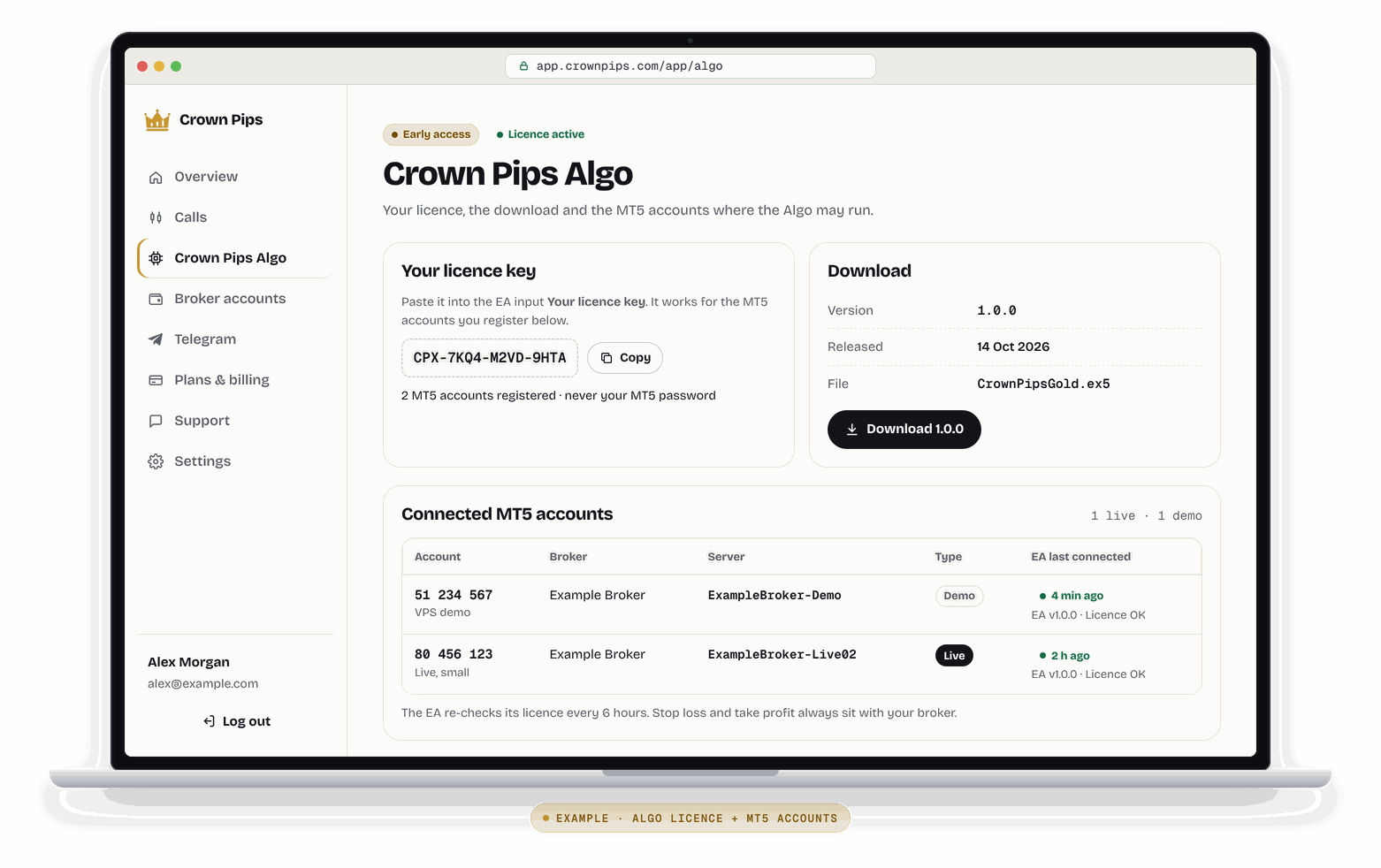
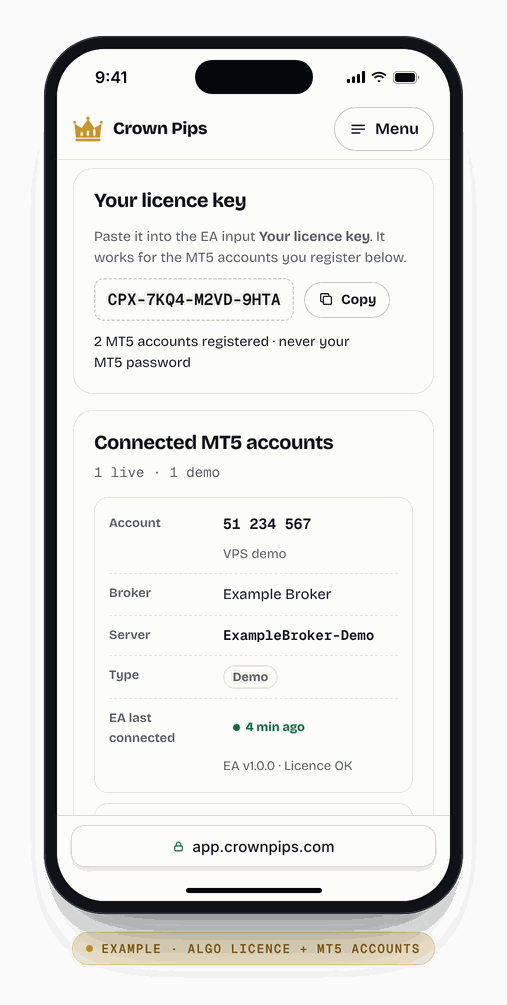
- Licence keyCopy it into the EA's inputs. It only works on the accounts you register.
- Every new versionDownload the latest EA and the setup guide in one place.
- Your MT5 accountsAccount number and server only. Never your password.
- EA last connectedSee per account when the EA last checked in.
Example screens. Account numbers, broker and server names are made up.
Settings you can read. Sizing you can check.
Early access. Included in Elite.
Crown Pips Algo is rolling out to Elite members in batches, monthly and yearly, at no extra cost. There's no public track record yet, so you won't see backtests, win rates or profit figures from us.
- 1Rules fixed in code
One setup, one market. The numbers on this page are the EA's default inputs.
- 2Early access · now
Rolling out to Elite members in batches, through the bot and the member dashboard. Feedback goes straight into the code and the setup guide.
- 3Your demo first
Run it on a demo account first, so you see how it behaves on your broker before real money is involved.
- 4Your call to go live
Start small. You choose the risk, and you can switch it off any time.
About the Algo
What do I need to run the Algo?
An active Elite plan, a trading account with any broker that offers gold (XAU/USD) on MetaTrader 5, and the MT5 desktop terminal on a computer or a VPS. Expert Advisors don't run in the MT5 mobile apps.
Does it work with my broker?
It works with any MT5 broker that offers XAU/USD. The Algo calculates the position size from your broker's own tick value, so different contract sizes are handled for you. Check two things once: attach it to your broker's gold symbol (the name can differ, for example XAUUSD or GOLD) and set your broker's server-time offset, so the UTC sessions line up.
Do I need a VPS?
No, but it helps. MT5 has to be open and online for the Algo to measure the Asia range, enter and manage trades — roughly 00:00 to 20:00 UTC on trading days. A VPS keeps it running when your own computer is off or asleep.
Can I change the risk?
Yes. Risk per trade is an input (default 0.5% of your account), and so are the max daily loss (default 2%) and the max trades per day (default 3). We suggest 0.5–1% per trade at most. Higher risk also means bigger losing days.
What happens if I lose connection?
Stop loss and take profit are sent with every order, so they sit on your broker's server even when your MT5 is offline. Break-even, trailing and the 20:00 UTC close need MT5 running: once it's back online, the Algo picks up the management of its open trades again.
Is profit guaranteed?
No. Nobody can guarantee profit. The Algo follows fixed rules, and fixed rules have losing trades, losing days and losing months. Automated trading can lose money — sometimes more than planned when prices gap or slip. Only trade with money you can afford to lose.
What does early access mean?
The Algo is new. We're rolling it out to Elite members in batches — the download, your licence key and the setup guide come through the bot and the member dashboard — and we keep improving the code and the guide based on feedback. There is no public track record yet, so we don't show performance numbers. Start on a demo account.
Does the Algo cost extra?
No. Crown Pips Algo is included in Elite, monthly and yearly, at no extra cost.
Can you see my account or touch my money?
No. The Algo runs inside your own MetaTrader 5, on your own account. Your money stays with your broker, we never ask for your password or login, and you can switch the Algo off any time.
Backtested and simulated results have limitations: they are built with hindsight, leave out real execution costs and do not reflect live trading. Past or simulated results don't guarantee future results.
Get the Algo with Elite.
Crown Pips Algo (early access, rolling out in batches) is included in both plans at no extra cost: $399 a year ($33.25 a month, save 32%) or $49 a month. Start on a demo account.
Founding price — locked in for as long as you stay subscribed. Prices go up as Crown Pips grows.